 Lineup for captains
 Lineup for captains
In the main window captains can make his/her lineup:
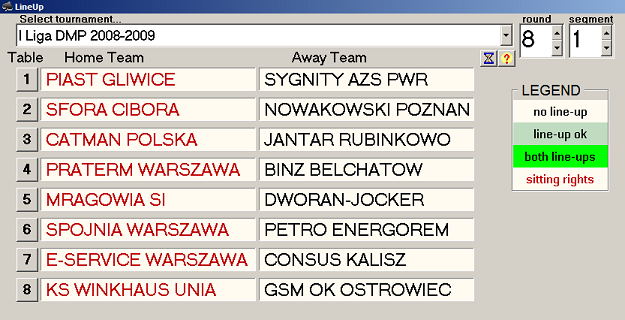
The upper Tournaments drop-down menu is filled by tournaments in selected group - select appropriate tournament using this list. Change the round and, eventually, segment. Rounds/segments already played cannot be selected. In the given round/segment there is separate button for each table. Team with sitting rights is printed in red (all teams are printed black if lineup is blind). For the given team it's background is white if there is no lineup, money-green if lineup is made and green if lineup is completed for entire table.
Click on team name or table number button. Enter your PIN. The table appears:
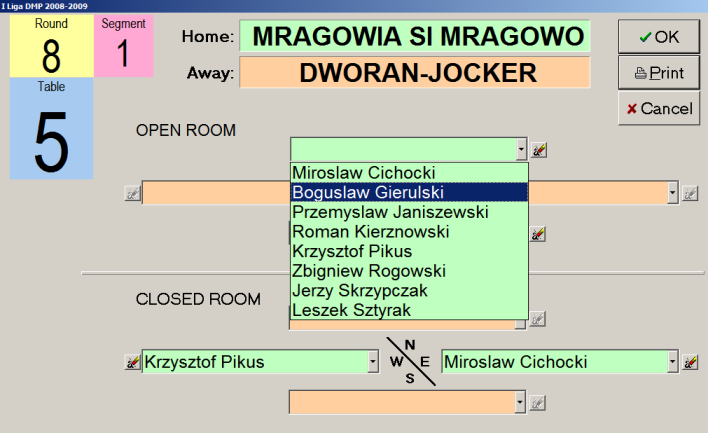
This table was opened by the captain of MRAGOWIA. He can fill his (green) places using drop-down menus at each position. The  button clears one and
  button clears all places. He can check who is playing in DWORAN-JOCKER by moving the mouse over opponent's team name or expanding one of red drop-down lists, but he cannot change anything there (note that opp's buttons are grayed).
MRAGOWIA captain will finish his job pressing OK button. CANCEL button discards all changes. If the computer have the printer connected, then the lineup can be printed.
The lineup, once made, cannot be changed by captain. He/she can return here to check or print the lineup, but changes can be made by authorized person (a TD).
If the linup is defined as normal, using sitting rights, then the "home" captain will see opponent's lineup (if already done of course).