 Edit headers for website and printouts
 Edit headers for website and printouts
Click on  or
or  button to edit common header for your pages on the website or for printouts respectively. This will popup the Event logo editor window:
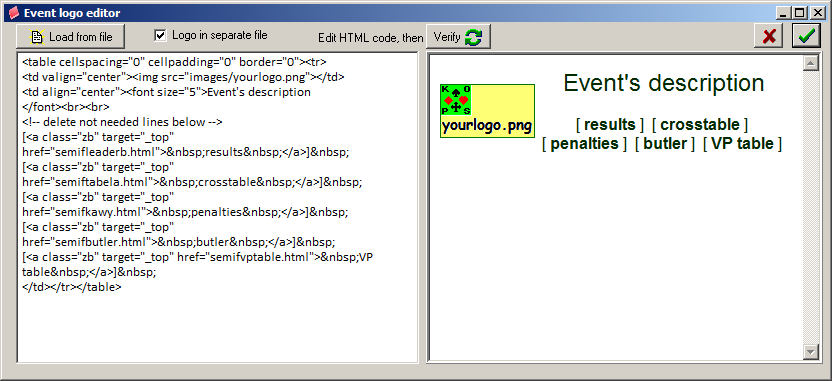
Header is a piece of html, usually a html table. It's source is in the left panel of editor. On the right you can see how your header will look like. What you can see on the picture above is a standard template, generated for the event with more than one round and the prefix set to semif. Standard template for events with one round (typically playoffs) will be a bit different, see 4. below. Let's analyze the code line by line:
<img src="images/yourlogo.png">
defines the name of graphic displayed - here it is the file yourlogo.png placed in images subdirectory on the website.
is a title of page, it is taken from Full name entry in the main Admin window, displayed using bigger font and with two linebreaks after it.
is an example of comment in html, not to be displayed.
is a link to results. It is formatted with "zb" style (refer to kolorki.css file in css directory for other possible styles) and will display prefixleaderb.html file in actual (target="_top", other possibility is "_blank" for new window) browser window. Results for one round events (playoffs) should point to prefixrunda1.html.
other links - refer to  button to see the results. There two ways using header, controlled by
  checkbox. If it is checked (recommended), then header will be in separate file and after change it is enough to upload only this file to the website. Otherwise after change of header you must upload all files.
Header for printouts is usually much simpler, event's full name is enough. There is no checkbox for printed header.
Exit Event logo editor using  button to cancel all changes.
  button will accept edited content and you will be asked if to send new header to to the website.