Contents
- Index
Creating/Selecting database for use with Players
After very first run of Players the window appears:
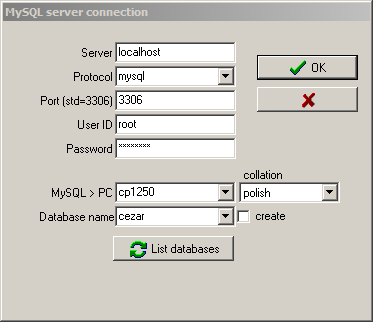
Fill in server name (usually localhost if mySQL is running on the same machine).Select protocol (at the moment mysql is the only choice).Fill Port number, user ID (normally root) and password - those values was set during mySQL installation.Select language for use with your PC - this can be- latin1 for western european languages
- cp1250 for eastern european languages
- cp1257 for baltic languages
- ascii for pure english, no accented letters
Select the appropriate collation, the way of comparing strings in your language.Enter the name for your database and mark create checkbox......or after filling connection details click on  button to select existing database. All databases will be listed below, those with Players info will be available under "Database name" dropdown list.Finally click OK button.
NOTE: the same window will appear if you select Database/Connect from menu or if you select Database/Disconnect, close Players and run the program again.