 Using Admin
 Using Admin
Learn how to drive the event using step-by-step guide.
Use the index below for detailed description of menus and buttons.
All functions are accessible from the main Admin window. Every menu command has it's associated button and some has also keyboard shortcut Ctrl-letter. Respectively every button and editable element has it's associated menu command. To execute a command click on it's button, click on menu and then select command from drop-down list, hit Alt key, then underlined letter in appropriate menu and finish with underlined letter in appropriate entry or Ctrl-letter shortcut.
For example to open the existing event click on  button, use Ctrl-O shortcut or use Alt E O sequence of keys (Alt e o will work as well).
Click on desired area below to get more help or use command index at the bottom of this page.
Event
Databases
Editors
Tools
...about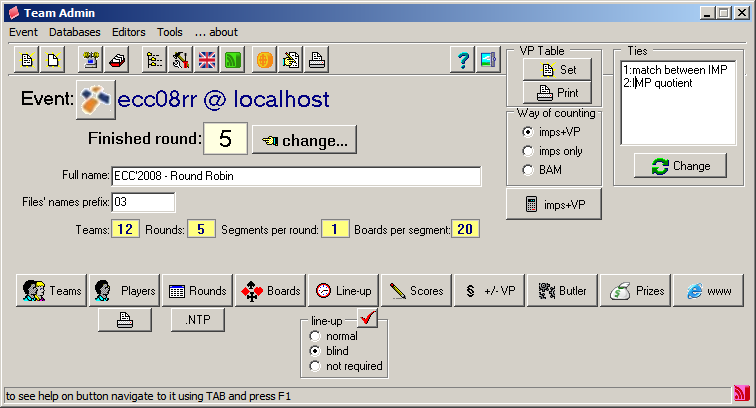
Open (Ctrl-O) existing tournament

Create New (Ctrl-N) event

Exit (Ctrl-X) the program

MySQL configures connection to MySQL database

BWS configure type and default behavior s bridgemates' databases
Recalculate (Ctrl-R) - tournament will move to the next segment/round after pressing this button. It is also possible to roll back the event.

Edit List of teams (Ctrl-T)

Edit List of players (Ctrl-P)

Print list of players

Edit Full name of event. Using mouse click twice on this line to enter edit mode. Full name will be used in titles of webpages windows and printouts.
Edit Prefix for filenames. Using mouse click twice on this line to enter edit mode.

Select Favicon for the website

Show/hide in place editor to change Way of counting

Ties

Set rounds

Use .NTP file

Import hands

Lineup

Show/hide in place editor to Set lineup type

View/edit scores

Penalties in VP

Configure Butler

Prizes

Printouts and www

Local www directory - all related files, web pages first of all, will go there

Page style controls web pages look and feel

Page language sets/change the www pages language

Transmission settings for Goniec and FTP

Send frames to www - some pages, so called frames, should be created and then sent to webserver before the tournament start

Logo editor for web page header

Print logo editor for header of printouts

popups a windows with program info