Contents
- Index
 Seting up the event
Click on  button or select Event / New from menu.
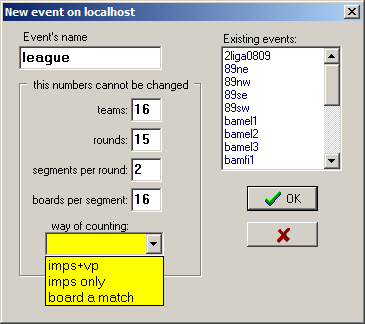
Enter the name of the event. Names are not case-sensitive. To avoid potential troubles use only letters, digits and underscore. Remember that the name cannot be a number, even in expotential form, eg. 1e5 is forbidden. Existing events are listed on the right. If you enter the name of existing event, then you must confirm this and existing data will be overwritten.
Fill the necessary numbers:
- teams - must be even (will be reverted to even if odd)
- rounds
- segments per round - sometimes this number will be different in different matches, enter the maximum here
- boards per segment
Numbers above, once entered, cannot be changed.
Select way of counting:
- imps+VP - you will be asked for VP table
- imps only - typically in playoff matches
- board a match - at the moment Polish way only: 10 score points makes a difference, 1:1 fo deuce, 2:0 for won board
Finally click OK. Next pop-up will appear:
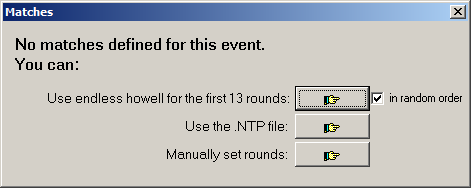
- select "Manually set rounds" for swiss/danish tournament or if you plan to set rounds in the future
- endless howell positioning, eventually shuffled, will be for first TEAM#-1 rounds
- or use already prepared .ntp file with positioning
Next steps invoked automatically:
- select appropriate table of VP when prompted
- select directory for the local website - all files related to this event will be placed there
Next steps to be done immediately in the main Admin window:
- enter the full name of event - full name will serve as tittle for printouts and webpages.
- enter the prefix for files' names - by default it is event's name, but you may wish to use something shorter;