Contents
- Index
 Connecting to MySQL
Select Databases/MySQL connection from menu or click  button.
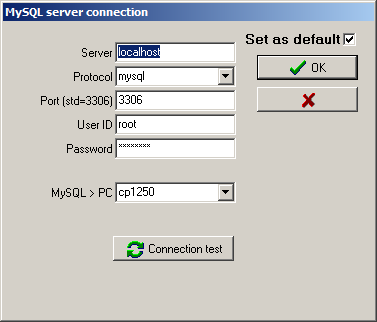
- If MySQL server is installed on the same machine then enter localhost as Server. It can also be another computer name, another computer IP address (eg. 10.0.0.21) or internet address provided to you by your ISP (eg. sql.polbridge.pl).
- Protocol must by mysql, the only possible on dropdown list.
- Port is usually 3306 (may be different if for some reasons you have entered another value during MySQL configuration).
- User ID is root for "your" server or is provided by your ISP.
- Enter your root's password or password provided by your ISP.
- Charset value for MySQL to Windows conversion should be selected from dropdown list. Possible values are:
- latin1 for western languages
- cp1250 for central european languages
- cp1257 for baltic languages
- ascii for pure english, without accented letters
Click on  button. You should get the list of existing databases (information_schema and mysql only on the new installation) and the green label saying OK!:
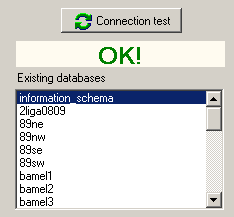
You will be warned about possible errors and the focus will be on entry where the error occured.
Check the  box if you want use the connection as default on your computer. Uncheck this box if you want actual connection during this run of Admin only.